Email with your domain

Mailboxes with your business name, for everyone on your team

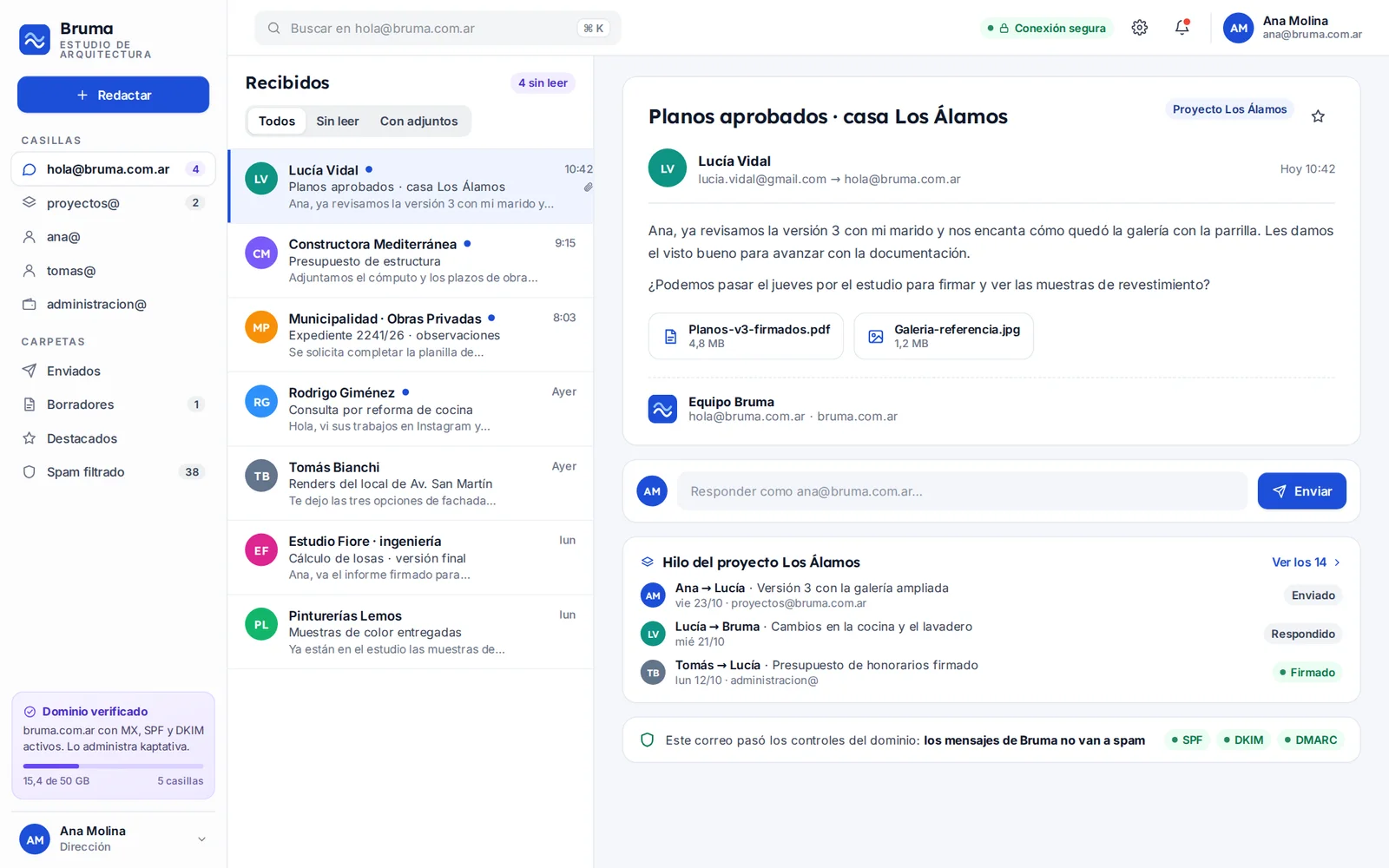
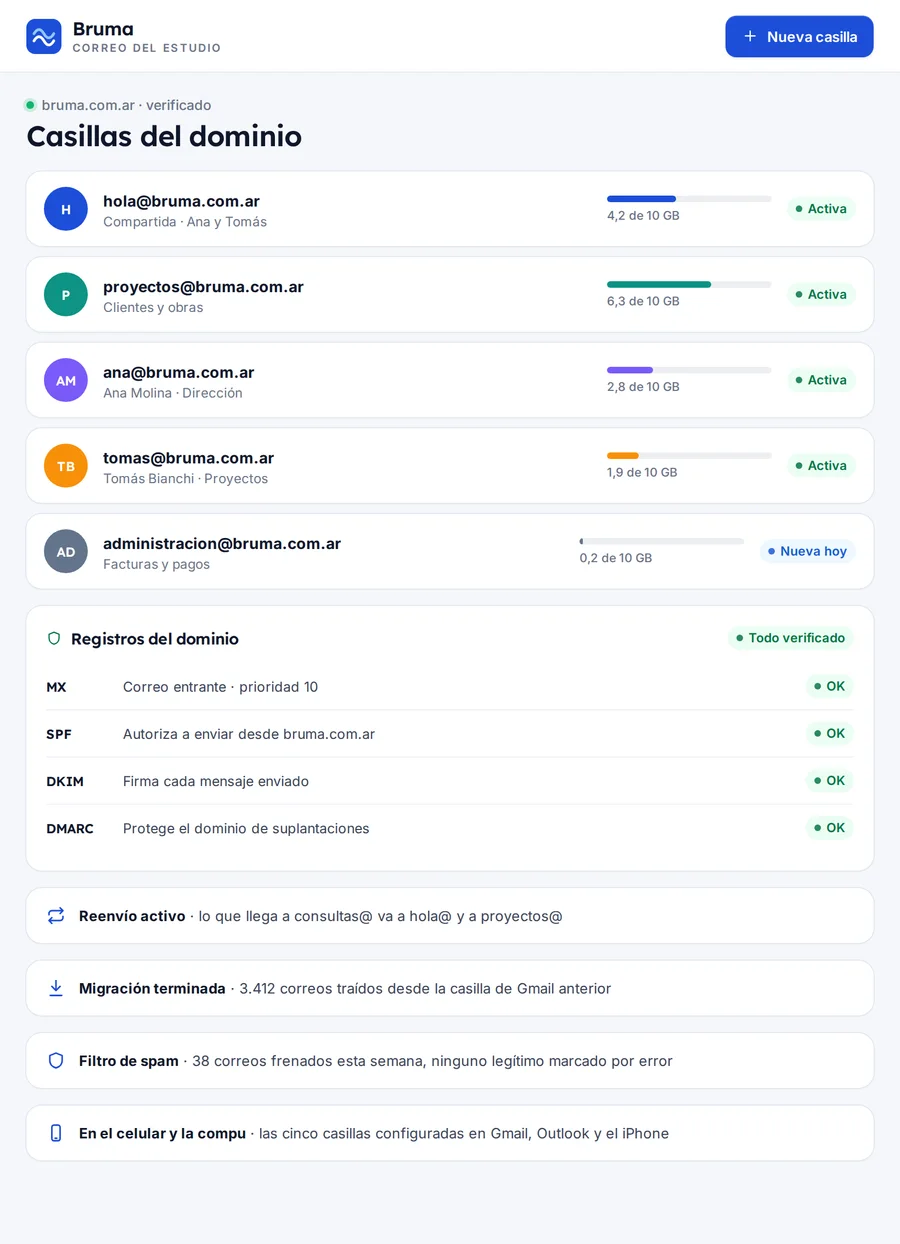
You go from the free account to name@yourbusiness.com.ar. Each person gets their own mailbox, the team gets shared mailboxes, and you add or remove whoever you need from the dashboard.

  • Mailboxes, aliases and shared mailboxes
  • Emails that reach the inbox, not spam
  • Daily backups and migration without losing anything
From US$ 5 a month, or US$ 4 billed yearly30-day guarantee
Under US$ 2 per mailbox · No lock-in · Your domain, in your name
An address that builds trust

Your clients recognize your name before they open the email.

An address like ana@bruma.com reads like what it is: a message from your business. And if someone leaves the team, the mailbox and its emails stay yours.

  • One mailbox per person

    name@yourbusiness.com.ar for each person on the team, with their own password and their own space.

  • Shared mailboxes

    ventas@, consultas@ or administracion@ that several people read at once, without passing a password around.

  • Aliases and forwarding

    Several addresses that arrive in the same mailbox, and forwarding so nothing gets lost when someone goes on vacation.

  • On your computer and your phone

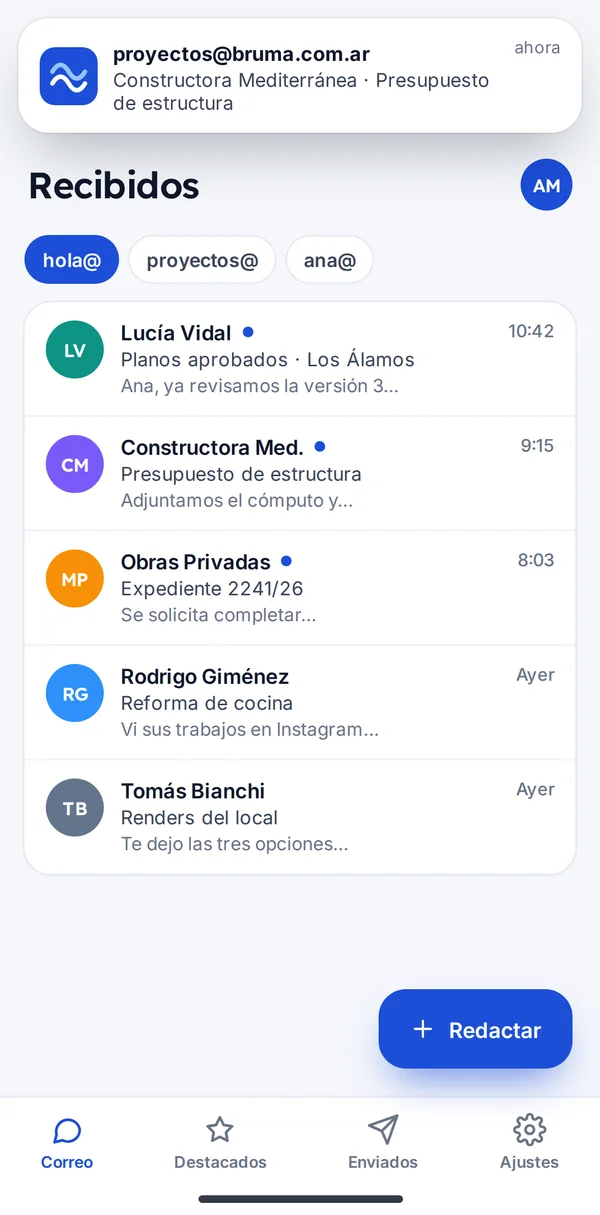
    Webmail from any browser and the mailbox set up in your phone’s email app, with everything in sync.

  • Antispam and antivirus

    Suspicious emails stay out of your inbox and attachments are checked before they arrive.

  • Signatures with your brand

    The same signature for the whole team, with logo, job title and phone number, set up once from the dashboard.

Before and after

From the free account to your business’s email

What you handle today with personal accounts and shared passwords, organized under your domain.

TodayWithout a system
From the first monthWith kaptativa
AddressA free account with numbers at the end
Addressname@yourbusiness.com.ar for each person
InquiriesOne password the whole team uses
InquiriesShared mailbox, everyone with their own access
DeparturesSomeone leaves and takes the emails with them
DeparturesYou remove the mailbox and the emails stay
SpamScams mixed in with client emails
SpamSpam filter and antivirus on every mailbox
DeliveryYour quotes land in the client’s spam
DeliveryVerified domain to reach the inbox
SignaturesEveryone has their own, or none at all
SignaturesOne signature with your brand for the whole team
PhoneSetting up email is a hassle
PhoneWe leave it working on every phone

Plans based on how many people need a mailbox

Three monthly plans in dollars, and on all of them a mailbox costs under US$ 2. No lock-in: you add a single mailbox or move up to the next plan when people join.

People with a mailbox
Currency
Billing

Starter

Up to 3 mailboxesIdeal for you

For the professional or small business: three mailboxes with your domain, webmail, a phone app, antispam and a signature with your brand.

US$ 5/ month

or US$ 4 per month billed yearly

  • Up to 3 mailboxes
  • 10 GB per mailbox
  • 1 shared
  • 30-day backups
  • Migration of your current emails
  • Webmail and phone app
  • Antispam and antivirus
  • Brand signature for the whole team
  • Verified delivery: SPF, DKIM and DMARC set up and monitored
  • Two-step verification and alerts for new sign-ins
  • Ticket support

Business

Up to 30 mailboxesIdeal for you

For the company with several areas: 50 GB per mailbox, multiple domains and an AI agent that sorts the shared mailboxes.

US$ 35/ month

or US$ 32 per month billed yearly

  • Everything in Team, plus:
  • Up to 30 mailboxes
  • 50 GB per mailbox
  • Up to 15 shared
  • 1-year backups
  • Multiple domains on the same account
  • AI agent that sorts emails and suggests replies
  • Priority WhatsApp support

Not sure which one fits? Tell us about your business and we’ll recommend a plan

30-day guarantee. If it doesn’t work for you in the first 30 days, we refund your first payment. Terms

  • We send you the payment options with your proposal
  • Your data and your domain, always yours
  • We reply within 24 business hours
Compare everything in each plan
What’s includedStarterUS$ 5 / monthRecommendedTeamUS$ 15 / monthBusinessUS$ 35 / month
MailboxesUp to 3 mailboxesUp to 10 mailboxesUp to 30 mailboxes
Space per mailbox10 GB per mailbox30 GB per mailbox50 GB per mailbox
Shared mailboxes1 sharedUp to 5 sharedUp to 15 shared
Webmail and phone app
Antispam and antivirus
Aliases and forwarding
Brand signature for the whole team
Add and remove people from the dashboard
Add a single mailbox: US$ 1.50 per month
Verified delivery: SPF, DKIM and DMARC set up and monitoredNew
Two-step verification and alerts for new sign-ins
Notifications from your website, store or system go out under your domain
Daily backup with recovery of deleted emails30-day backups90-day backups1-year backups
Shared calendar and contacts—
Archive and forwarding for anyone who leaves the team—
Multiple domains on the same account——
AI agent that sorts emails and suggests replies——
Ticket support
Priority WhatsApp support——
Included in all three plans
  • Setup at no cost
  • Migration of your current emails
  • Webmail and phone app
  • Antispam and antivirus
  • Brand signature for the whole team
  • Verified delivery: SPF, DKIM and DMARC set up and monitored
  • Two-step verification and alerts for new sign-ins
  • Ticket support
Other costs, only if you need them

Setup, one-time services and monthly add-ons.

If you need more
  • Single extra mailbox: +US$ 1.50 a month

What you pay only once

Only if you need it: you pay once and it never shows up on your bill again.

  • Extra trainingOne hour by video callUS$ 20 per hour

More than 30 people

For large teams or those with several offices, we put together a proposal based on the number of mailboxes and the space you need.

Request a proposal

Don’t have a domain yet?

We help you choose it and register it in your name. The domain cost is paid separately, to the registrar.

Ask us

Prices are in US dollars.

Your whole team’s email, managed from one dashboard

Mailboxes, aliases, signatures and access in one place. You change things yourself or ask us to do it.

Everyone has their own mailbox on their computer and their phone. You manage them all from one dashboard.

1 · Your customer

On your team’s phones

Each person reads their mailbox and the shared ones from the phone’s email app or from the browser, with the firm’s signature already in place.

2 · You, in the dashboard

In your dashboard

You add whoever joins, remove whoever leaves, and change access or space in a couple of clicks, without waiting for a technician.

Getting your emails delivered

Your quotes reach the inbox, not spam

We set up the records that Gmail, Outlook and Yahoo require in order to trust your domain, and we monitor them every month. If your domain shows up on a spam list or someone tries to send emails pretending to be you, we let you know and fix it.

  • SPF, DKIM and DMARC set up from day one
  • Monthly check of reputation and spam lists
  • Alert if someone tries to use your domain
Your domain, in your name

The domain and the emails stay in your name

The domain is registered in your name or your company’s, with your domain registrar. We set up the email and remind you before each renewal, but you are the holder.

  • Domain registered in your name
  • Setup that helps your emails reach the inbox
  • Reminder before each domain renewal
Included in the Business plan

The AI agent sorts the shared mailbox and leaves replies ready for you

With the Business plan, the agent reads what arrives at mailboxes like consultas@, sorts it by topic, notifies the right person and suggests a reply using your texts. You review it and send it: nothing goes out without your approval.

  • Sorts each email by topic and urgency
  • Notifies the right person
  • Suggests replies that you review before sending
How the AI agent works

What you can add to your email

Services you turn on in your system when you need them, without switching platforms.

Maintenance and upgrades

Your website on the same domain, with a security certificate, daily backups and hours for changes.

Monitoring, backups, updates and hour packs.

Email and WhatsApp campaigns

News and reminders by email to your clients, sent from your domain and with details on who opened them.

Up to 50,000 emails per month on the Campaigns plan; more sends from +US$ 15 a month.

AI content

Sample replies and texts for your emails written with AI, in your business’s tone.

Product descriptions, news, banners and photo touch-ups.

Works with the tools you already have

  • Gmail
  • Google Calendar
  • Cloudflare
  • n8n
  • WhatsApp
  • Outlook
  • Apple Mail
  • Thunderbird

Use another tool? We connect your system to the software you already have via API. Ask us

FAQ

What people ask us before getting started

Have another question? Write to us and we'll answer for your case.

Ask your question

From the first conversation to your system up and running

  1. 1
    We look at how you use email

    How many people need a mailbox, which shared addresses they use, and where your emails and your domain are today.

  2. 2
    We prepare your mailboxes

    We create the mailboxes, aliases and signature, and copy your emails, folders and contacts over from the account you use today.

  3. 3
    Your team starts using them

    We make the switch on the domain, get email working on every computer and phone, and show the dashboard to whoever manages it.

Do I need to have a domain?

Yes. The domain (for example, yourbusiness.com.ar) is registered in your name or your company’s with your domain registrar, and its cost is paid separately. If you don’t have one yet, we help you choose it and register it.

Will I lose the emails I have today?

No. At the start we copy your emails, folders and contacts from the account you use today, and in the meantime you keep receiving email as usual.

Can I read it from my phone’s email app?

Yes. Besides webmail, we set up every mailbox in your phone’s email app and in the email program on your computer, with everything in sync.

What is a shared mailbox?

An address like ventas@ or consultas@ that several people read, each with their own access. It means an inquiry doesn’t depend on who’s in that day.

What happens to the mailbox of someone who leaves the team?

You remove it from the dashboard. From the Team plan on, their emails are archived and whatever is sent to them is forwarded to whoever you choose. The emails belong to your business, not to the person.

Is there a minimum commitment?

No. You pay month to month (or yearly, with one month free) and you can add or remove mailboxes whenever you want. If you leave, we help you download your emails or move them to another provider.

Can I add a single mailbox without changing plans?

Yes. Each extra mailbox adds US$ 1.50 per month to your plan. When the next plan makes more sense for you, we let you know.

Why do a business’s emails sometimes land in spam?

Because Gmail and Outlook distrust domains that don’t have their sending records (SPF, DKIM and DMARC) set up properly. We set them up from day one and check them every month.

What happens if a mailbox runs out of space?

We let you know before it fills up. You can free up space by deleting old attachments or move up to the next plan, which comes with more space per mailbox.

Does the AI agent send emails on its own?

No. On the Business plan it sorts the emails in shared mailboxes, notifies whoever it concerns and suggests replies, but each reply goes out only when a person approves it.

How much does email with your domain cost?

There are three monthly plans in dollars: Starter at US$ 5, Team at US$ 15, and Business at US$ 35 a month. Billed yearly, each month costs less: from US$ 4. Setup is included in the plan. One-time services, only if you need them: extra training, US$ 20 per hour. If you need more in a given month: single extra mailbox, +US$ 1.50 a month.


Your business, with its name on every email.

We show you how your mailboxes will look and what it takes to move your team’s emails over, no strings attached.

Proposal for your team, no commitment

The brands, products, people and photos shown on the screens are fictional and are for illustration only.