Appointments and bookings

Your schedule open 24 hours a day, with a deposit and a WhatsApp reminder

Your clients choose a service, professional, or class time and book from your website or a link. They leave a deposit with Mercado Pago, confirm on WhatsApp the day before, and if the class is full, they join the waitlist.

  • Schedule by professional, room, or resource
  • Deposit with Mercado Pago when booking
  • Classes with limited spots and a waitlist
From US$ 19 a month, or US$ 17 billed yearly30-day guarantee
Monthly plan in dollars · Your schedule and your clients stay yours
Fewer messages to book appointments

Your schedule fills up from a link, and you stop coordinating by chat.

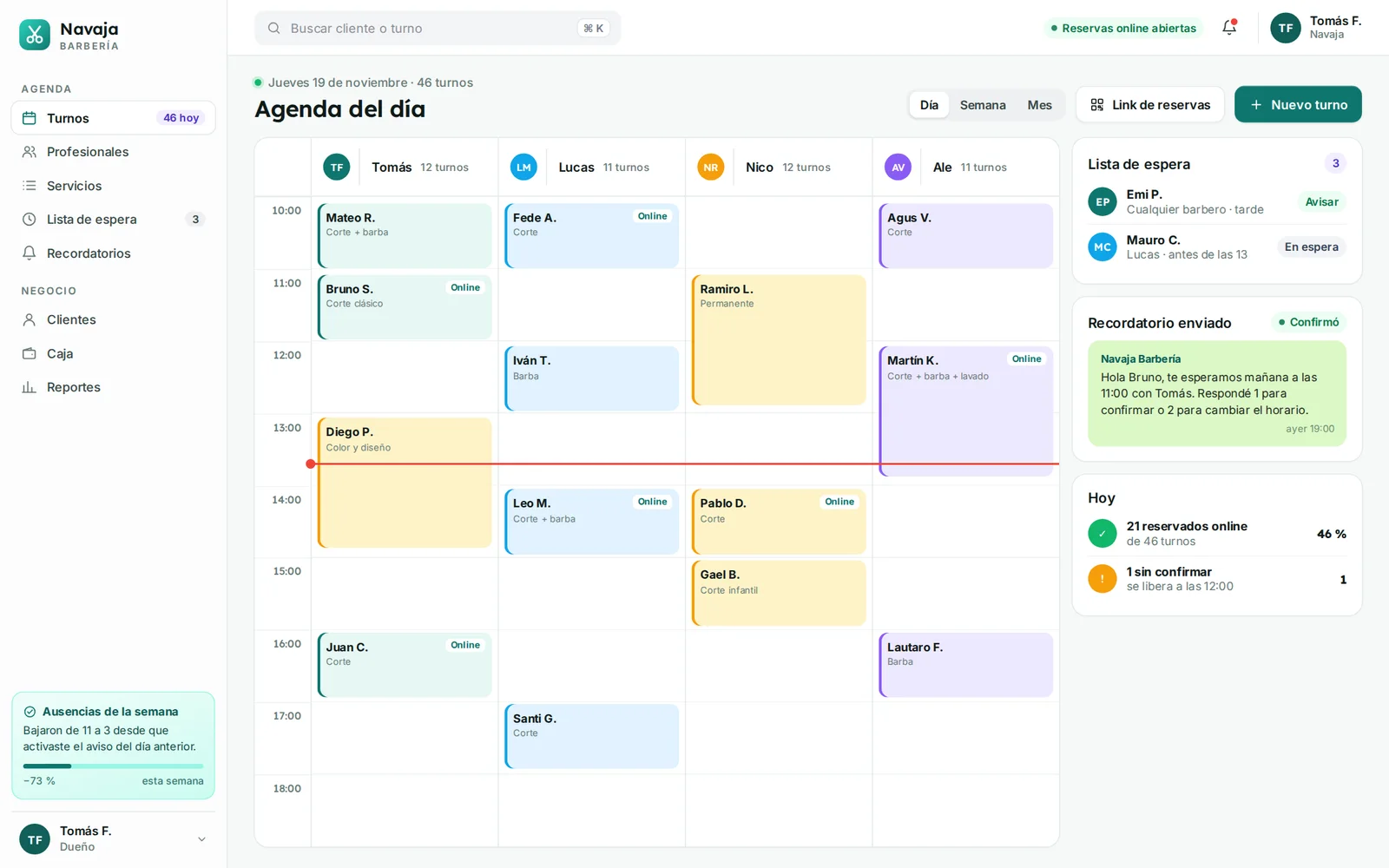
Every booking comes in with its deposit, its time slot, and its confirmation. If someone cancels, the spot is freed up and offered to the first person on the waitlist. You see the full day for every room and professional.

  • Bookings around the clock

    From your website, an Instagram link, or your WhatsApp status: they see the open times and book without messaging you.

  • Deposit with Mercado Pago

    The time slot is held once the deposit is paid, with your cancellation policy shown before they pay.

  • A reminder that confirms

    The day before, they get their booking on WhatsApp and confirm or release the spot with a single reply.

  • Limited spots and waitlist

    Every class has its limit. If it fills up, they join the waitlist and any spot that opens up is offered automatically.

  • Memberships and packs

    You sell monthly memberships and class packs, and every booking deducts a credit from your client’s balance.

  • Blocks and holidays

    You mark vacations, holidays, or a room repair, and those times stop being offered without touching each schedule.

Before and after

From scheduling by chat to online bookings

What you coordinate today message by message, handled from a single link.

TodayWithout a system
From the first monthWith kaptativa
BookingsTen messages to find a time
BookingsThe client sees what’s open and books on their own
No-showsEmpty slots with no warning
No-showsDeposit at booking and confirmation the day before
Full classesA paper list at the front desk
Full classesA waitlist that notifies people on its own when a spot opens
MembershipsClasses tracked in a spreadsheet
MembershipsCredits deducted with each booking
HolidaysTelling people one by one that you’re closed that day
HolidaysDate blocked and clients with bookings notified
LocationsA different schedule at each branch
LocationsAll locations in the same account

Plans based on how many schedules you manage

Three monthly plans in dollars. Choose based on how many professionals, rooms, or resources take bookings, and switch plans when you add locations.

Already chose your industry system? Appointments and bookings already comes in its plans at no extra cost. These prices are for using it on its own, without an industry system.See plans by industry
Professionals or rooms
Currency
Billing

Schedule

Up to 3 schedulesIdeal for you

For an independent professional or a small space: online bookings with deposits, WhatsApp reminders, and up to three schedules.

US$ 19/ month

or US$ 17 per month billed yearly

  • Up to 3 schedules
  • 1 location
  • 3 users
  • SetupFree: branding and the plan’s integrations, up to 250 records imported from spreadsheets, 1 recorded training session and 15 days of onboarding support.
  • Services and hours uploaded for you
  • Bookings from your website and by link
  • Schedule per professional, room, or resource
  • Deposit with Mercado Pago when booking
  • Reminder with WhatsApp confirmation
  • Blocks, vacations, and holidays
  • Ticket support

Network

With AI agentIdeal for you

For a network with several locations or many schedules, with an AI agent that takes bookings on WhatsApp around the clock.

US$ 59/ month

or US$ 54 per month billed yearly

  • Everything in Studio, plus:
  • Unlimited schedules
  • Up to 5 locations
  • Up to 25 users
  • AI agent on WhatsApp (1 number, 500 conversations a month)
  • Priority WhatsApp support
  • SetupFree: branding and the plan’s integrations, up to 2,000 records imported from spreadsheets, 2 one-on-one training sessions and 30 days of onboarding support.

Not sure which one fits? Tell us about your business and we’ll recommend a plan

30-day guarantee. If it doesn’t work for you in the first 30 days, we refund your first payment. Terms

  • We send you the payment options with your proposal
  • Your data and your domain, always yours
  • We reply within 24 business hours
Compare everything in each plan
What’s includedScheduleUS$ 19 / monthRecommendedStudioUS$ 35 / monthNetworkUS$ 59 / month
SchedulesUp to 3 schedulesUp to 10 schedulesUnlimited schedules
Locations1 location1 locationUp to 5 locations
Team users3 usersUp to 10 usersUp to 25 users
Bookings from your website and by link
Schedule per professional, room, or resource
Deposit with Mercado Pago when booking
Reminder with WhatsApp confirmation
Blocks, vacations, and holidays
Classes with limited spots and a waitlist—
Monthly memberships and class packs—
Courses with enrollment and online paymentNew—
Occupancy and attendance reports—
AI agent on WhatsApp (1 number, 500 conversations a month)——
Ticket support
Priority WhatsApp support——
Included in all three plans
  • Setup at no cost
  • Services and hours uploaded for you
  • Bookings from your website and by link
  • Schedule per professional, room, or resource
  • Deposit with Mercado Pago when booking
  • Reminder with WhatsApp confirmation
  • Blocks, vacations, and holidays
  • Ticket support
Other costs, only if you need them

Setup, one-time services and monthly add-ons.

If you need more
  • Extra user: +US$ 4 a month
  • Extra location (Network plan): +US$ 10 a month
  • 500 more agent conversations (Network plan): +US$ 15 a month

Meta bills WhatsApp reminders separately: about US$ 0.03 each. With 300 reminders in a month, around US$ 9.

Setup

Choose how to start: on your own, with us, or with everything loaded.

  1. 1FreeDo it yourself with our guides

    Create your account and set it up at your own pace, with step-by-step guides and ticket support.

  2. 2Included in the planWe help you set it up

    We set up your brand and the plan’s integrations, import your spreadsheets and train your team.

  3. 3One-time paymentWe leave it ready and loadedUS$ 25 per 100 products or records

    We enter by hand whatever isn’t in spreadsheets, or bring it over from the system you use today.

What you pay only once

Only if you need it: you pay once and it never shows up on your bill again.

  • Move from another store or systemProducts, customers and balancesUS$ 90
  • Extra trainingOne hour by video callUS$ 20 per hour

Custom

Franchises, more than 5 locations, or your own booking rules: we build the proposal around how you work.

Request a proposal

Already have a website?

You add the booking button to your current site or share the link on Instagram and WhatsApp, without changing websites.

See how it works

Prices are in US dollars.

Professionals, rooms, and classes in a single schedule

You set what can be booked, how long it lasts, who handles it, and how many spots it has. The system organizes the rest.

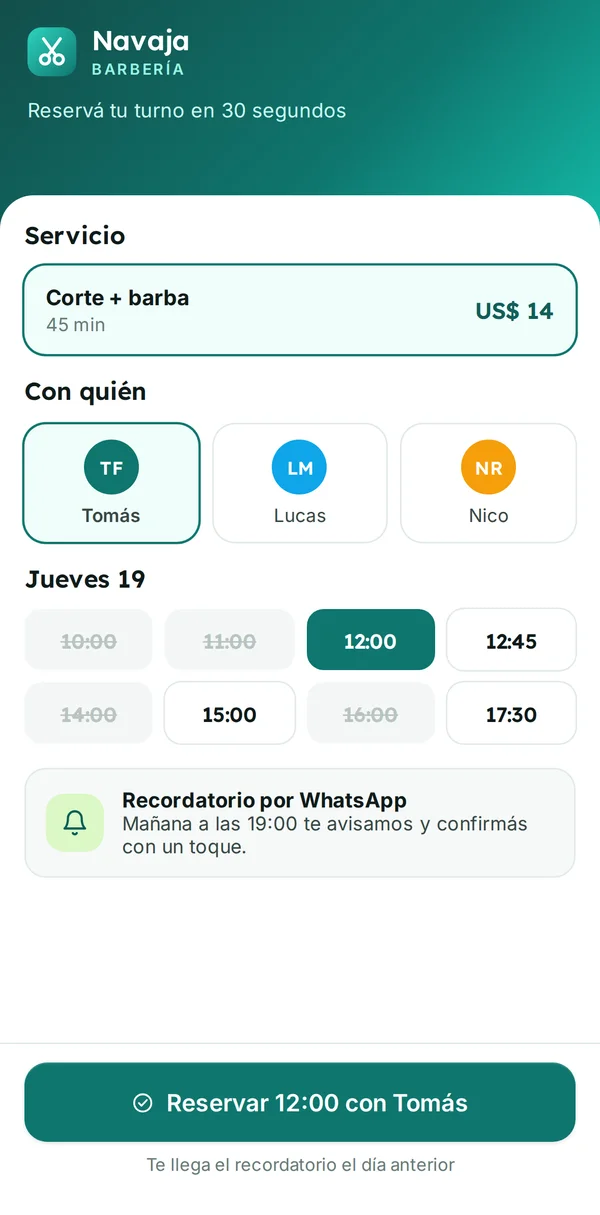
Your client books and pays the deposit in a minute. You see every schedule in full without answering messages.

1 · Your customer

On your client’s phone

They open the link, choose the service, professional, day, and time, and pay the deposit or use a credit from their pack. If they can’t make it, they cancel by replying to the reminder.

2 · You, in the dashboard

On your dashboard

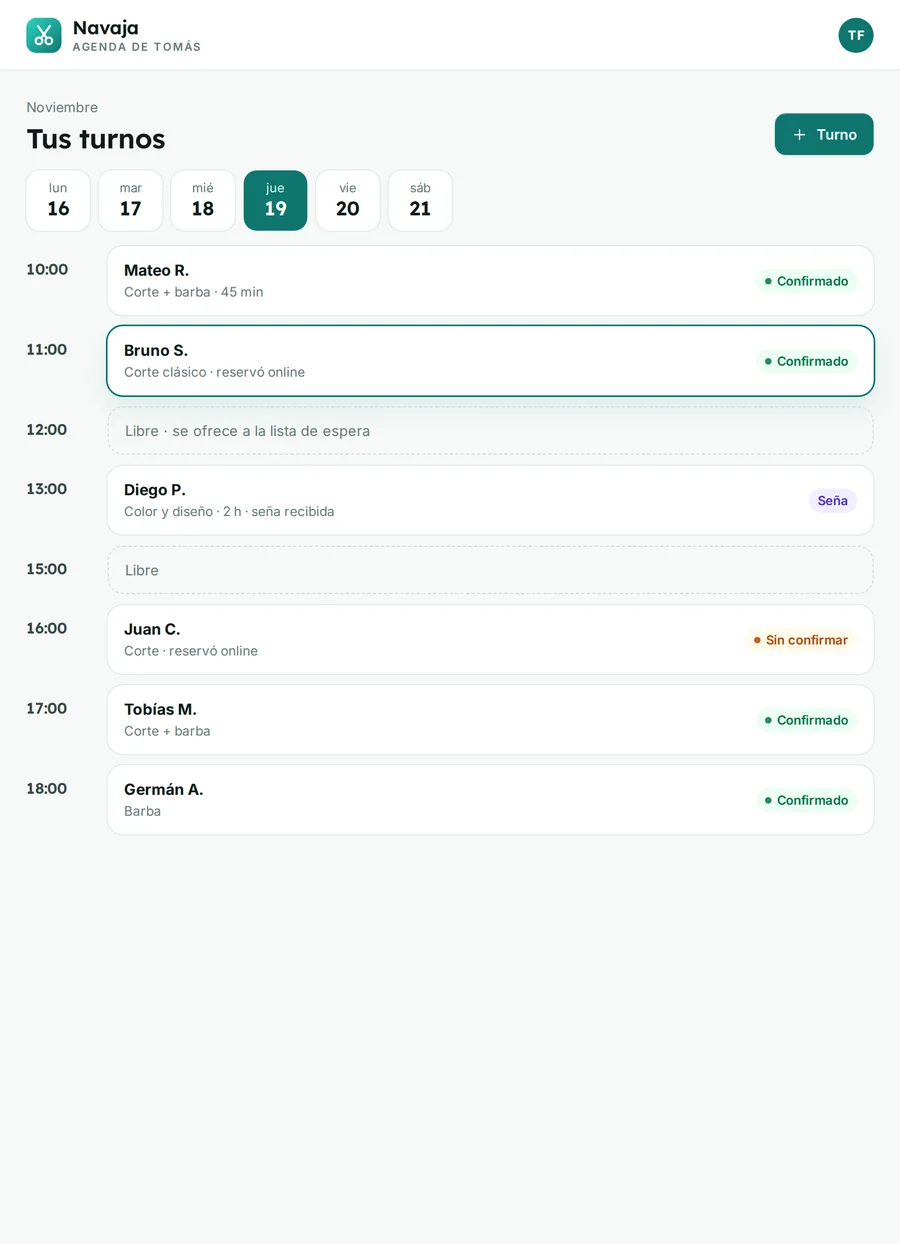
Each booking comes in with its deposit or credit, its service, and its professional. You see everyone’s schedule, who confirmed, and who’s waiting for a spot.

Memberships, packs, and courses

What you sell in advance, deducted with every booking

You create monthly memberships with a number of classes per week, credit packs with an expiration date, and courses with a start date. They are bought online, the balance sits in the client’s account, and every booking deducts from it automatically.

  • Memberships with classes per week and monthly renewal
  • Credit packs with an expiration date
  • Courses with limited spots, sessions, and online payment
Multiple locations

All your locations in one account, each with its own schedule

Each location with its stations, team, and hours. The client chooses where to book and their membership can be valid at one location or at all of them. You see each location’s occupancy and the total for the network.

  • Schedule, rooms, and team of their own at each location
  • Memberships valid at one location or at all
  • Reports by location and for the whole network
Included in the Network plan

Let them book on WhatsApp even when the front desk is closed

The WhatsApp agent knows your activities, hours, spot limits, and prices: it answers what’s open, books the appointment or the class, sends the deposit link, and adds people to the waitlist. Anything it can’t resolve goes to your team with a summary.

  • Offers the real open times from every schedule
  • Books, collects the deposit, and adds people to the waitlist
  • Cancels and reschedules according to your rules
How the AI agent works

What adds to your bookings

Services you turn on in your system when you need them, without switching platforms.

E-invoicing

The invoice for each deposit, membership, or course goes out with the payment and reaches the client by email.

Type A, B and C invoices, credit notes and delivery to the customer.

Email and WhatsApp campaigns

Notices about new classes, courses, and promotions by email or WhatsApp for people who agreed to receive them.

Up to 50,000 emails per month on the Campaigns plan; more sends from +US$ 15 a month.

AI content

Texts for your activities and your posts with AI, in your brand’s tone.

Product descriptions, news, banners and photo touch-ups.

Works with the tools you already have

  • WhatsApp
  • Mercado Pago
  • Google Calendar
  • Google Meet
  • Calendly
  • Instagram
  • Google Maps
  • Google
  • Meta

Use another tool? We connect your system to the software you already have via API. Ask us

FAQ

What people ask us before getting started

Have another question? Write to us and we'll answer for your case.

Ask your question

From the first conversation to your system up and running

  1. 1
    We get to know your schedule

    What can be booked, how long each service or class lasts, how many professionals, rooms, or courts you have, and how you take bookings today.

  2. 2
    We show you your system

    A demo with your brand, your activities, and your hours, and the plan that fits your business.

  3. 3
    You open online bookings

    We upload services, hours, memberships, and clients, get the Mercado Pago deposit up and running, and teach your team the system.

Do my clients have to download an app?

No. They book from your website or from a link that opens on their phone, with nothing to install, and the notices reach them on WhatsApp.

Does it work for courts, rooms, or equipment, and not just professionals?

Yes. Each schedule can be a professional, a room, a court, or a piece of equipment. You define how long each appointment lasts, how much it costs, and how many people fit.

Can I ask for a deposit on only some services?

Yes. You choose which ones require a deposit, how much it is, and until when they can cancel at no charge. Your cancellation policy is shown before they pay.

Are there costs on top of the monthly plan?

Deposits and payments with Mercado Pago carry the fee that Mercado Pago charges. WhatsApp reminders go out through the official API, which Meta charges for per message at its current rate: below the plans you can see roughly what a month of reminders costs.

How does the waitlist work?

When a class fills up, anyone who wants in joins the waitlist. If a spot opens up, the system offers it to the first person on WhatsApp with a time limit to accept; if they don’t reply, it goes to the next one. It comes with the Studio plan.

Can I bring over my current clients and memberships?

Yes. When we start, we import clients, memberships, and balances from your spreadsheets, or from the system you use if it allows exporting. Your clients’ data belongs to your business.

Can the AI agent cancel or change appointments?

Yes, within the rules you define: how many hours ahead a cancellation is allowed, whether the deposit or credit is returned, and how many times something can be rescheduled. Anything outside those rules is passed to your team.

How much does the appointments and bookings system cost?

There are three monthly plans in dollars: Schedule at US$ 19, Studio at US$ 35, and Network at US$ 59 a month. Billed yearly, each month costs less: from US$ 17. Guided setup is included in the plan; if you’d rather have it done and loaded for you, it costs US$ 25 per 100 products or records. One-time services, only if you need them: move from another store or system, US$ 90; extra training, US$ 20 per hour. If you need more in a given month: extra user, +US$ 4 a month; extra location (Network plan), +US$ 10 a month; 500 more agent conversations (Network plan), +US$ 15 a month.


Your schedule open and a front desk with no pending messages.

We build a demo with your activities and your hours for you to explore, no commitment.

Demo with your schedule, no commitment

The brands, products, people and photos shown on the screens are fictional and are for illustration only.